The order arrives after kick-off
The client has agreed, the purchase order is being signed. The consultants, meanwhile, have already started recording time.
The commitment received from the client becomes the financial framework of the project. Everything that follows — production, margin, invoicing — is measured against what is entered here. It is where money enters the platform.

It is the most common situation in a services company: teams start, the purchase order arrives later. In most tools, that lag creates a hole in the accounts that nobody fills.
The client has agreed, the purchase order is being signed. The consultants, meanwhile, have already started recording time.
Without a budget, and therefore without a daily rate, time spent cannot become production. The project shows cost and zero revenue.
The close starts with incomplete figures. The variance is discovered at quarter end, when it can no longer be recovered.
The first module records the contractual commitment. The second breaks it down into quantities and rates, deliverable by deliverable — this breakdown is what makes the margin calculable.
Amounts ordered, due dates, link to the deliverables concerned. Remaining to invoice is derived from what was committed and what has already been invoiced. A project can carry several purchase orders, successive or complementary.
For each deliverable and each resource: a quantity of days and a daily rate. Their product forms the budget. Two versions coexist — the original budget, frozen at signature, and the revised budget, which follows the life of the project.
The screen reads in two blocks: what you budgeted, and what is planned in light of the team's assignments.
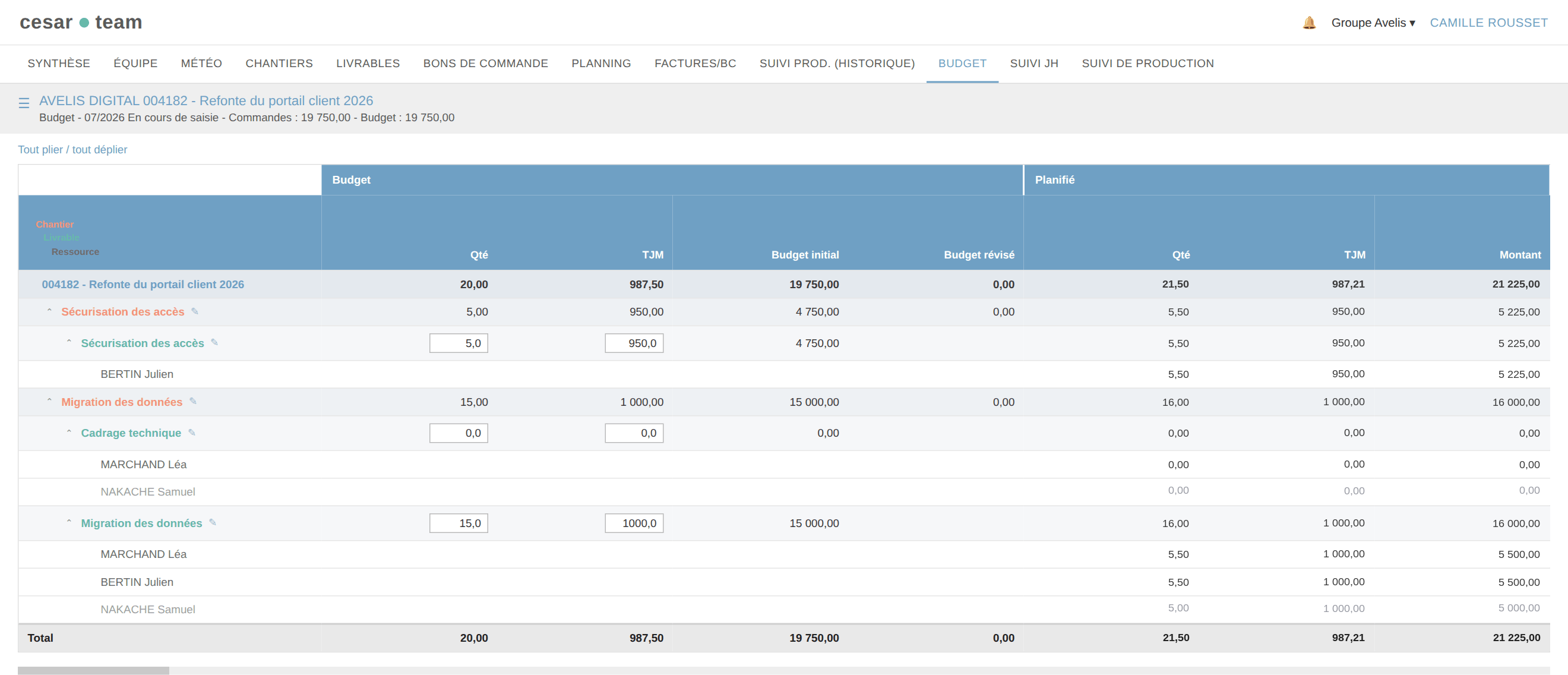
Rows collapse by project, workstream, deliverable and resource: you can read an overall envelope or the detail of a single person on a single deliverable.
When a budget arrives late or changes along the way, the question is not only “what is the new amount” but “what happens to everything already consumed”. CESAR answers both.
It remains the contractual reference of the launch. It is never overwritten: it is the baseline against which drift is measured at the end.
Amendment, scope extension, rate change: the new envelope becomes the steering reference, without erasing the previous one.
Prior actuals do not stay at zero: they are revalued and join the project's production, with no manual adjustment.
The project recovers the production it is due for the period in which the time was recorded. No manual entry, no spreadsheet rework.
A project with no budget but with actuals does not stay silent. Three checks bring it to light before the period is closed.
As soon as a project shows actuals with a zero budget, a message prompts the manager to enter an envelope before month-end close, even without a signed purchase order.
A “projects without budget but with actuals” checkbox lets the manager deal with all cases in one go rather than one by one.
A warning icon marks these projects in the portfolio list, with no need to open each record to spot them.
The budget is not an end in itself: it is the reference against which every amount in the project is then measured.
Bring a real deal — its purchase order, its breakdown into deliverables, its billing model. We will show you how the envelope is broken down and what it produces downstream.